> ## Documentation Index
> Fetch the complete documentation index at: https://docs.replit.com/llms.txt
> Use this file to discover all available pages before exploring further.
# Generate an app icon
> Use Replit's built-in image generation to create PixelGames' app icon.
export const AiPrompt = ({children}) => {
return
{children}
;
};
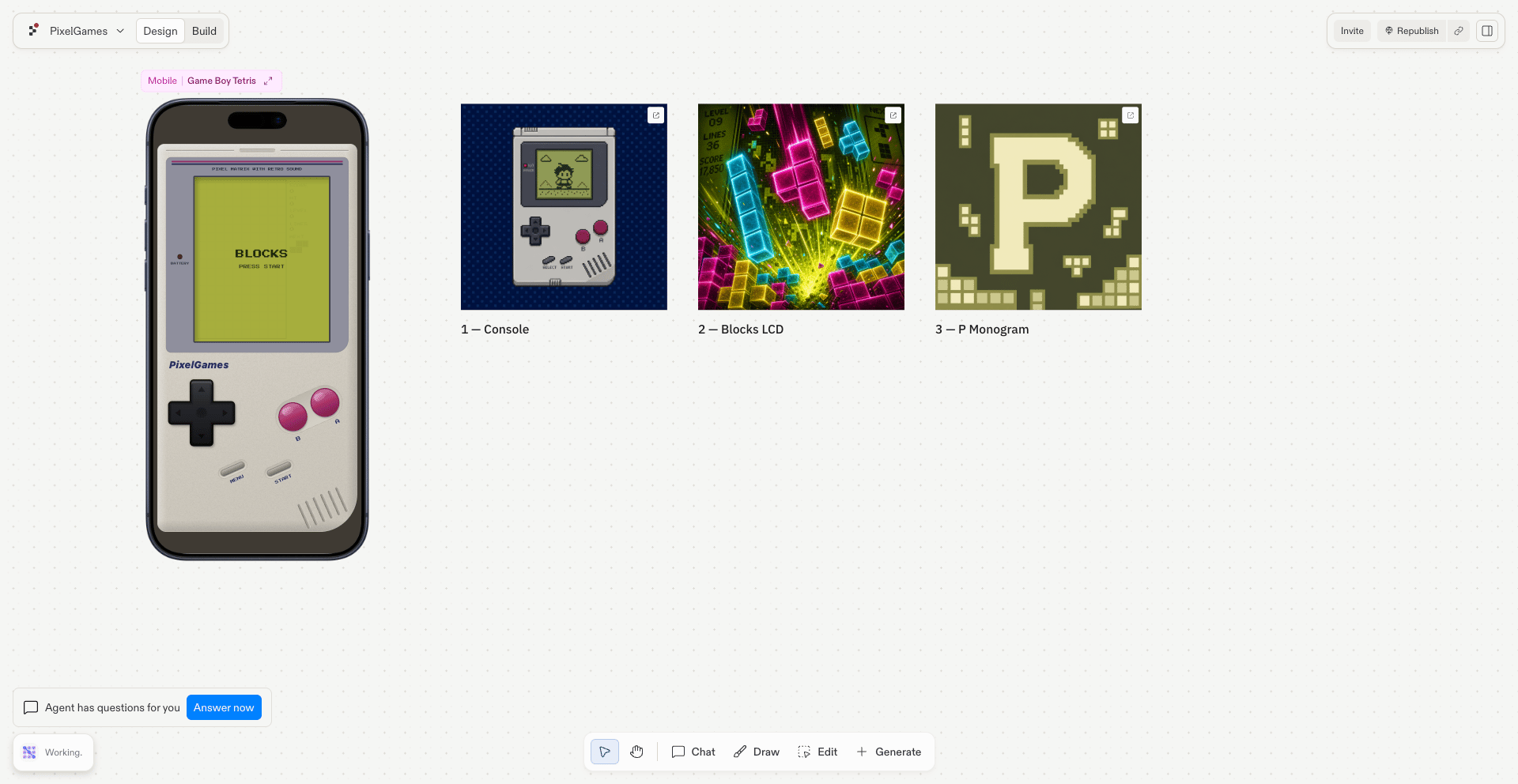
export const appIconPrompt = "Generate 3 different 1024x1024 app icon concepts for PixelGames.";
Both stores require an app icon before they'll accept a submission. Replit can generate one
directly, no separate design tool required.
## What each store needs
* **App Store:** 1024×1024, no transparency, no rounded corners, Apple adds those.
* **Google Play:** 512×512.
## Generate it
Switch to **Design** mode before sending the prompt, this tells Agent to generate images.
{appIconPrompt}
Agent generates a few directions at once, so you can compare and pick before committing to
one.
 ## What's next
Create the marketing screenshots each store needs.
Use this icon in the App Store listing.
## Related
* [Submit to Google Play](/build/mobile-publish-android)
## What's next
Create the marketing screenshots each store needs.
Use this icon in the App Store listing.
## Related
* [Submit to Google Play](/build/mobile-publish-android)