

Introduction
Looking to add SSO to the sign-in flow of an app you build on Replit? See Add SSO to your app (Clerk). This page covers enabling SSO for your Replit organization — how your team signs in to replit.com.
Only organizations with an Enterprise plan are able to use SAML SSO. You can purchase the Enterprise plan directly from the pricing page or contact us for a guided walkthrough.
Set up SAML SSO
1
Open Authentication settings
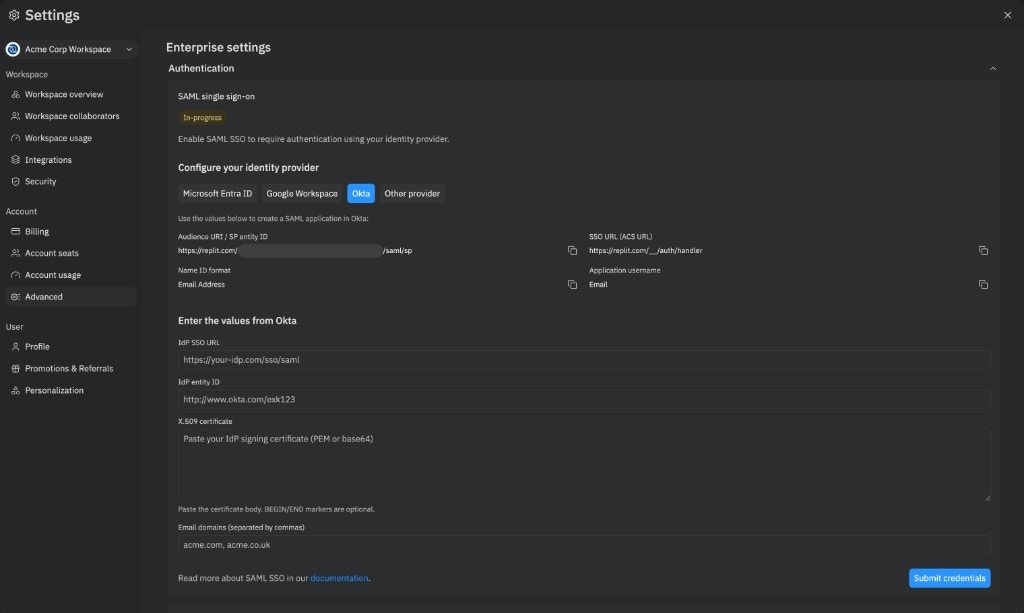
Open the workspace switcher, choose your Enterprise workspace, and open Settings. Select Advanced, expand the Authentication section, and click Enable SSO on the SAML single sign-on card.The status pill changes to In-progress and the wizard reveals the values you need for your IdP.
2
Choose your Identity Provider
Select your IdP under Configure your identity provider:
- Microsoft Entra ID
- Google Workspace
- Okta
- Other provider
3
Create the SAML application in your IdP
In your IdP’s admin console, create a new SAML application using the values shown by Replit:
4
Enter the values from your IdP
Once the SAML application is created in your IdP, copy the following values back into the Enter the values from your provider section in Replit:
- IdP SSO URL — the URL Replit redirects users to when authenticating.
- IdP entity ID — identifies your IdP to Replit.
- X.509 certificate — the IdP signing certificate in PEM or base64.
BEGIN/ENDmarkers are optional. - Email domains — comma-separated list of the domains your users sign in with (for example,
acme.com, acme.co.uk). Include all aliases and subdomains your IdP may report.
gmail.com) cannot be claimed.5
Wait for provisioning
The status pill changes to Provisioning… while Replit creates the underlying SAML tenant. This usually takes about a minute. When it completes, the status pill becomes Active and your Organization can sign in with SSO.If provisioning fails, the status pill becomes Setup failed and Replit automatically cleans up any partial state. Click Try again to restart the wizard.
Choose your email domains
You can claim multiple email domains and subdomains for your Organization. Any user that attempts to sign up with an email domain that matches your claimed domain is required to use SAML SSO. Your claimed domains should match what your IdP reports for your users. If you use email domain aliases, include them as well to prevent users from signing up without using SSO. For example, if your company uses email domains matchingacmeco.com, foo.acmeco.com, and acmebiz.com, claim all three when you submit credentials.
Replit validates each claimed domain against the email addresses of your admins. To add or remove domains after activation, edit the Email domains field on the Authentication card. To claim a domain that doesn’t match an existing admin’s email, contact support@replit.com.
Using SAML SSO
Signing up with SAML doesn’t automatically invite users to your Organization. For automated user management and bulk operations, see SCIM instead.
FAQ
What happens to users who already have accounts on replit.com before SAML SSO was set up?
Once SAML SSO is enabled for your Organization, all users with claimed SSO email domains are required to use SSO to log in. Existing users can no longer use their previous authentication methods (email or social login) if their email matches the SSO domain. They aren’t automatically added to your Organization.Are users automatically deprovisioned in Replit when my IdP removes access?
No, SAML SSO only handles authentication. For automated user provisioning and deprovisioning, you can use SCIM integration, which is available for Enterprise customers. SCIM lets you sync your IdP’s directory to automatically manage user roles and provisioning.Are Organization seats automatically consumed when users are given access in our IdP?
No, seats are only consumed once a user accepts the invitation to your Organization.What if SAML setup fails?
The wizard reports the failure with a Setup failed pill, and Replit automatically rolls back any partial provisioning. Click Try again to restart the wizard, double-check your IdP values, and resubmit credentials. If the error persists, contact your account manager.How do I disable SAML SSO?
Self-service disable isn’t supported yet. Contact your account manager to turn off SSO for your Organization. You can still self-serve edits to claimed email domains from the Authentication card after activation.Related Resources
SCIM
Learn about automating user management with SCIM integration
Groups & Permissions
Understand how to manage user roles and access